Details
-
Bug
-
Resolution: Fixed
-
 Major
Major
-
1.0.2
-
None
-
Operating System: Windows VISTA
Platform: Intel
Description
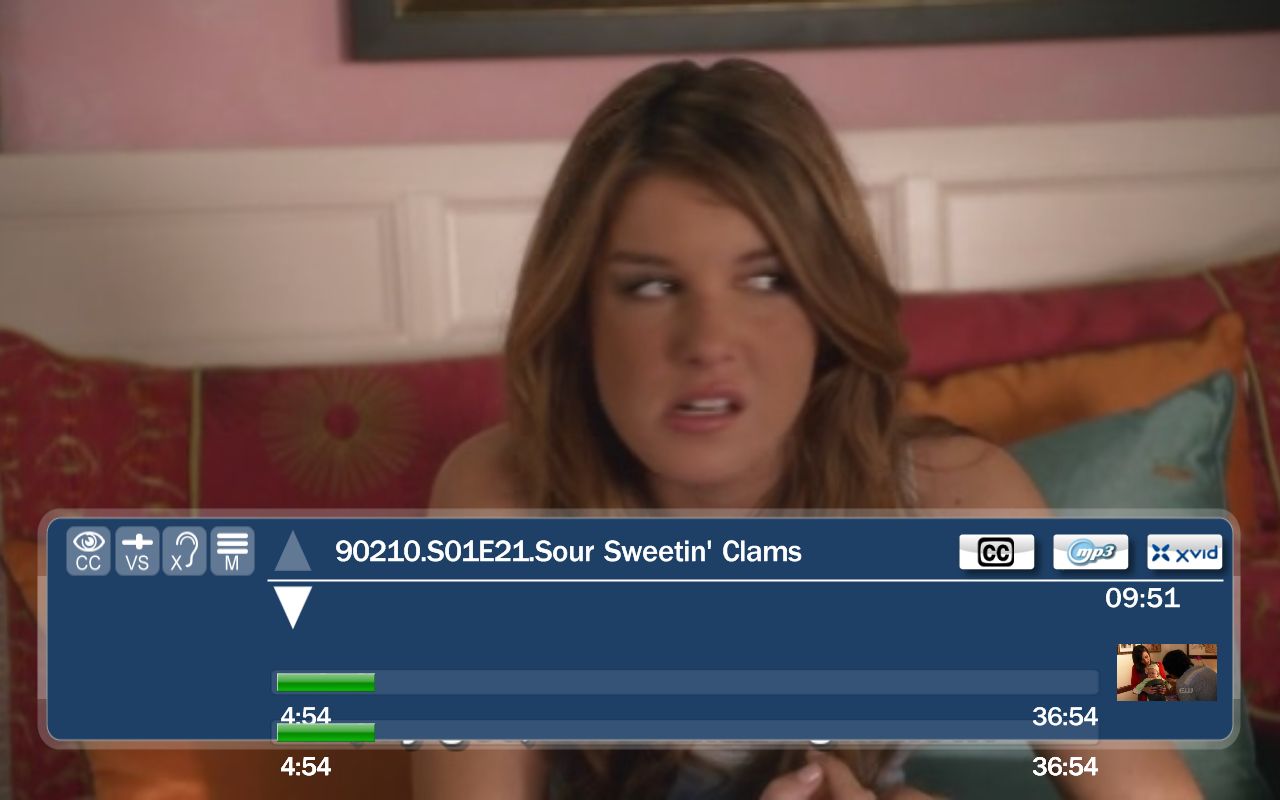
If you move OSD a bit up in Screen Calib (offset -50) the timeline occurs twice & doesn't follow properly(see attached image).
h4. Steps to Reproduce
Start MP -> Settings -> Screen Setup -> Screen Calib -> & then to OSD position, set it to something else & test OSD in Videos.
h4. Additional Information
Reported on forum by mironicus & confirmed by ronilse
Forum thread:
http://forum.team-mediaportal.com/mediaportal-1-1-0-alpha-453/osd-position-timeline-does-not-change-after-screen-calibration-66979/
h4. Steps to Reproduce
Start MP -> Settings -> Screen Setup -> Screen Calib -> & then to OSD position, set it to something else & test OSD in Videos.
h4. Additional Information
Reported on forum by mironicus & confirmed by ronilse
Forum thread:
http://forum.team-mediaportal.com/mediaportal-1-1-0-alpha-453/osd-position-timeline-does-not-change-after-screen-calibration-66979/